Plans from $27/mo·100% refund within 24h·Cancel anytime
Script → storyboard → animatic
AI image + video in one timeline
Voice, music & SFX built in
Client-ready MP4 exports
An animatic is a timed sequence of storyboard frames with temp audio — narration, music, sound effects — assembled so a team can review pacing, scene flow, and story beats before any real animation or production work begins. Think of it as the rough cut of a film that doesn't exist yet.
An animatic is a timed storyboard: frames + per-frame duration + voice, music, and SFX.
This piece explains exactly what an animatic is, when it's used, how it differs from a storyboard, and what goes into making one.
The short definition
An animatic is a moving storyboard. You take the static frames you've already drawn (or generated) and give them timing. Then you layer in placeholder audio — a scratch voiceover, temp music, basic sound effects — so the sequence plays through as a low-fidelity version of the final film.
Directors, editors, agencies, and animation studios use animatics to answer one question: does this sequence actually work? If it doesn't, fixing it at the animatic stage costs a day. Fixing it after production costs a month.
Why animatics exist
Animation is expensive. Live-action shoots are expensive. Once you're in production — actually animating a character, rendering a 3D scene, shooting on location — changes hurt. A director who realizes mid-animation that a scene is half a second too long, or that the punchline comes after the wrong reaction shot, has two choices: accept it, or burn money fixing it.
An animatic surfaces those problems before they're expensive. It compresses the entire film into a version you can watch end-to-end in 30 minutes of editing, not 30 days of animation.
That's why almost every serious animation pipeline — feature films, commercial spots, TV series — includes an animatic step. Pixar makes them. DreamWorks makes them. Any competent agency directing a 30-second ad makes them before shooting.
Animatic is the bridge stage: boards + timing + scratch audio, before budget commits.
Animatic vs storyboard — the actual difference
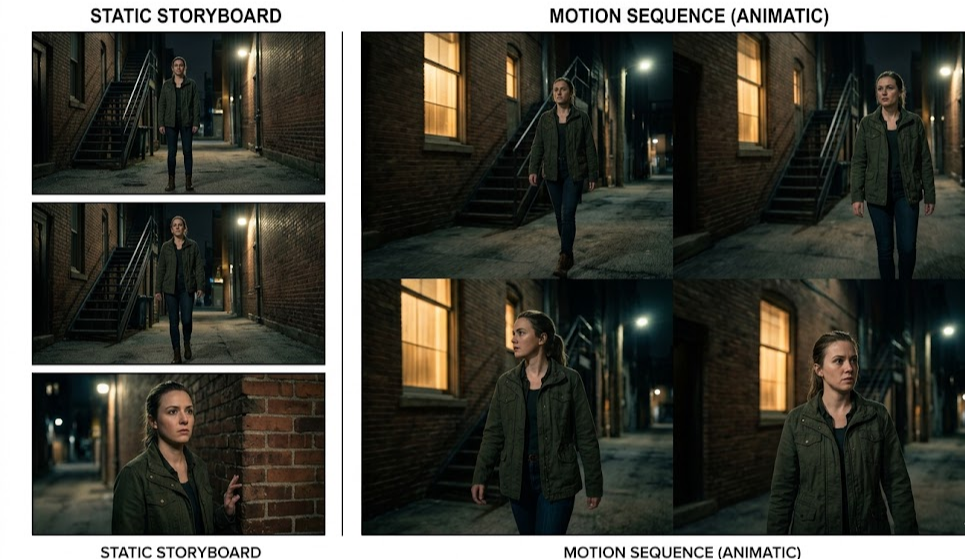
A storyboard is static. A series of images, one per shot or key moment. You look at them one at a time and imagine how they flow.
An animatic is the storyboard in time. The same frames, but with:
Duration per frame — each panel holds for a specific number of seconds
Transition order — frames cut, dissolve, or hold in sequence
Playback — you press play and watch the thing end-to-end
You can't tell from a storyboard whether the pacing works. You can tell immediately from an animatic. That's the whole point.
Animatic vs rough cut — also different
A rough cut is made from real footage. You've shot the scenes or animated them, now you're assembling them in an edit. The visuals are real.
An animatic is made before any real footage exists. The visuals are storyboard frames — drawings, AI-generated images, or photo references. Nothing is "final" except the timing.
What's in a typical animatic
A basic animatic needs:
Storyboard frames — one per shot, or a few key poses per shot if the motion is complex
Timing metadata — how long each frame plays
Scratch voiceover — usually the director or animator reading dialogue, not final voice actors
Temp music — any track that captures the mood; licensed versions come later
Basic sound effects — footsteps, door slams, ambient cues, just enough to test timing
A more advanced animatic might include:
Camera moves indicated — pans, zooms, tilts over still frames
Basic 2D animation — blinks, mouth flaps, a head turn — not full animation, just enough to test a beat
Multiple audio layers — dialogue, music, and SFX on separate tracks
Transitions between scenes — cuts, cross-fades, wipes
You don't need all of this. Commercial animatics often run at the basic end. Feature-film animatics from Pixar can be closer to a fully animated rough with dialogue and music.
Who uses animatics
Animation studios (2D, 3D, stop-motion). Every major animation pipeline includes an animatic stage. It's where story is finalized before animators spend a month on a shot.
Commercial production. Agencies animatic their 30-second spots before filming — the client signs off on the animatic, and if the shoot deviates, there's a conversation.
Indie filmmakers and directors. For pre-visualization on live-action films, an animatic acts like a digital storyboard you can screen. Directors bring them to DPs and production designers.
Educational content creators. Animatics let a teacher or course creator test pacing on an explainer video before recording final voiceover.
Music video directors. Treat an animatic like a moving concept board to pitch to the artist or label.
How long does an animatic take to make
The traditional workflow: storyboards done first (days to weeks), then imported into an editing app (Premiere, Final Cut, or specialized tools like Flix), timing set manually, audio dropped in. A 2-minute animatic from an existing storyboard might take half a day.
Modern AI-assisted workflows compress that. If you generate the storyboard frames with AI and use a tool that directly converts frames to a timeline with audio layers, a 2-minute animatic can be built in under an hour.
Common mistakes people make
Animating before animaticing. The entire point of an animatic is to test timing cheaply. Skipping it means you'll find the pacing problems after expensive work is done.
Over-polishing the animatic. Final voice actors, licensed music, detailed animation — none of that belongs in an animatic. If it takes two weeks, you've defeated the purpose.
Treating timing as approximate. Test with the actual seconds you think each shot needs. "About three seconds" is not a plan.
Skipping the audio. A silent animatic is barely better than a storyboard. Drop in any scratch audio — even if it's you reading dialogue into your phone — so you can feel the rhythm.
Not screening it. An animatic is made to be watched. Watch it with fresh eyes. Show it to someone who hasn't seen the project.
Tools people use to make animatics
Traditional: Adobe Premiere, Final Cut Pro, DaVinci Resolve — assemble your frames as a video sequence with audio layers.
Storyboard-first: Boords, Storyboarder, Flix — native animatic building from the storyboard frames.
AI-native: M Studio — generate the storyboard frames with AI, add timing, voice, music, and SFX in one workflow, export MP4.
The right tool depends on whether you're starting from drawn frames, AI-generated frames, or starting from scratch.
From animatic to finished film
An animatic is almost always the second step in a production pipeline — script first, animatic second. After the animatic gets signed off:
Animation or live shoot happens — the real visuals replace the storyboard frames
Final voice is recorded and replaces the scratch voiceover
Final music and SFX replace the temp audio
Editing refines the cuts based on what was shot or animated
Color grading, VFX, final mix finish the film
The animatic is the through-line. It's the document that answers "does the sequence work" — once that answer is yes, everything after is execution.
FAQs
Is an animatic the same as an animation pre-viz? Close, but not identical. Previs is specifically a pre-visualization of live-action shots, often using 3D proxies for cameras, actors, and sets. An animatic is more general — it's any timed storyboard with audio, whether for animation or live action. In live-action pipelines, previs and animatic are sometimes used interchangeably.
Do professional animation studios actually make animatics? Yes, universally. Pixar, DreamWorks, Disney, Laika, Studio Ghibli — every major animation house builds animatics as a core stage of their pipeline. It's not optional.
How rough should an animatic be? Rough enough that changes cost minutes, not days. If you're polishing character expressions or running it through a render pipeline, it's no longer an animatic.
Can I make an animatic with AI? Yes — and this is where the workflow is going. Generate storyboard frames with AI, add timing, layer in AI-generated or scratch audio, and export. Tools like M Studio compress animatic production to hours instead of days.
What file format do animatics use? Almost always MP4 for sharing and review. The working file lives in whatever tool you built it in (Premiere project, Boords project, Storyboard Pro file).
Is an animatic the same as a leica reel? Yes. "Leica reel" is an older animation-industry term for the same thing — a timed storyboard with scratch audio. The term comes from the Leica camera company, whose cameras were originally used to shoot storyboard panels onto film. Modern productions just call them animatics.