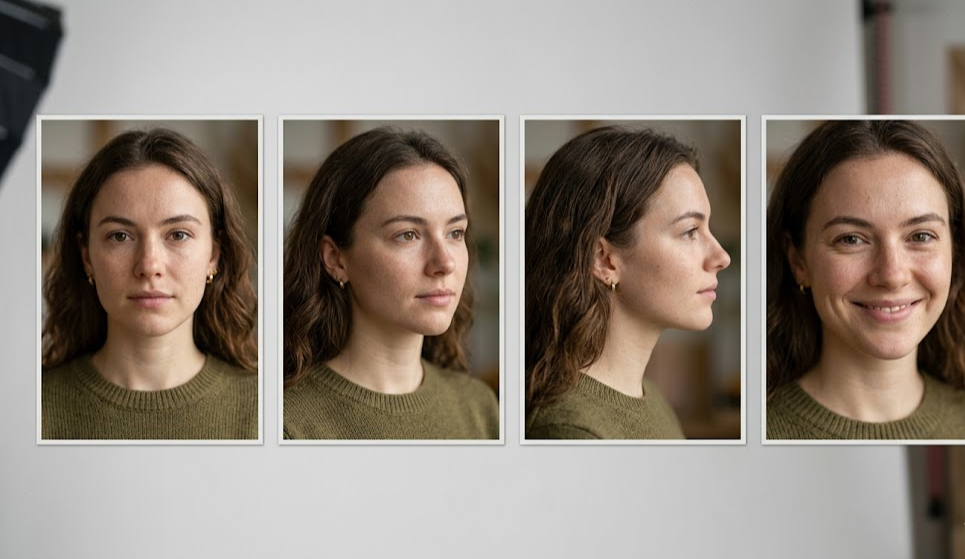
AI character consistency means that a character you generate in frame 1 looks like the same person in frame 40 — same face, same body, same costume, same visual identity — even though the AI generated each frame independently. Without it, your AI-generated storyboard is a slideshow of different people who happen to share a name. Consistency is the single feature that separates a usable AI storyboard tool from a generic AI image generator.
This post covers why character consistency is hard, how AI tools solve it in 2026, what still breaks, and why mStudio's approach makes a 40-frame storyboard actually feel like it comes from one film.
 A 6-frame AI storyboard using character references — the same two actors appear in every frame, same face, same costume, same lighting world.
Why character consistency is hard for AI
A diffusion model generates each image from noise. Every generation is — mathematically — a separate event. Nothing in the model inherently "remembers" what your protagonist looked like in the last frame it made.
The naive workflow — write a prompt, get an image, write another prompt, get another image — produces drift. Frame 1 has a brown-haired woman in her 30s with a red jacket. Frame 2 has a slightly different brown-haired woman in a slightly different red jacket. Frame 10 has an auburn-haired woman in a crimson jacket. By frame 40 your film has four different leads.
This is why "just use an AI image tool for storyboards" doesn't actually work. Every AI tool that claims storyboarding needs to answer the consistency question, or its output becomes unusable past 3-4 frames.
How character consistency actually works in 2026
Three techniques solve it:
1. Character references (the primary technique)
You generate or upload one image of each character. The AI saves that as a reference. Every subsequent generation receives the reference as input, conditioning the model to preserve the character's identity.
Good implementations support:
- Multiple characters — unique refs for each named character in your project
- Costume variations — same character, different outfits across scenes, locked at scene level
- Emotion variation — the same face can be happy, sad, angry, without becoming a different person
- Angle variation — front, profile, back, over-the-shoulder, three-quarters
Weak implementations give you a single "look" and the moment your camera moves, the character drifts.
2. Style references (the world consistency partner)
Characters live inside a world. If the lighting, color palette, and production design drift, the characters feel different even when they're technically the same. Style references lock the world — "this is what the diner looks like at 2am" — across frames.
3. Seeding and provider control
Different AI providers handle consistency differently. Google Imagen has strong character preservation with reference images. Gemini Image excels at emotion variation. In mStudio, you can switch providers per shot when one handles a specific challenge better.
What character consistency does NOT solve (yet)
Even with 2026's best tools, some things still drift:
Full-body kinetic motion. A character running past the camera at full speed might have subtly different features than the character standing still. High-motion blur interacts with identity preservation.
Extreme angle changes. Character references are strongest in front and three-quarter views. A pure overhead or pure below-subject shot sometimes shows drift.
Long-distance wide shots. When the character occupies 5% of the frame, the model has fewer pixels to "match" against the reference. Widest shots can drift.
Child vs adult transitions. If your story needs the same character aged up or down, you'll need separate references per age.
The failure mode most AI storyboard tools have
Testing a tool's consistency is simple. Generate a 10-frame storyboard of your protagonist walking through 10 different settings. Put the frames side by side. If you'd pick the "protagonist" out of a police lineup in all 10 frames — the tool has real consistency. If you'd hesitate on frames 4-6 — that tool's consistency is marketing.
Most generic AI image tools (Midjourney, raw Stable Diffusion, basic DALL-E) fail this test. Dedicated AI storyboard tools (mStudio, Storyboarder.ai, LTX Studio, Higgsfield) pass it.
Why character consistency matters commercially
A storyboard exists to communicate. If the DP looks at frame 8 and can't tell whether that's the protagonist or a new character, the storyboard failed at its basic job.
For agency-client presentations, inconsistent characters make the whole project look amateurish. For pitch decks, they destroy credibility. For director communication with crew, they create questions on set that the storyboard was supposed to answer.
 Left: AI-generated boards without character references, showing drift across frames. Right: mStudio with character refs locked — same actor across the full sequence.
How mStudio handles character consistency
The workflow is three steps:
Step 1: Lock character references at project start. Generate or upload one image per main character. Name them (Anna, Ray, Kid). Save as references.
Step 2: Reference names persist across the project. When you generate scene 4 frame 12, Anna's reference is automatically applied. You don't re-upload, re-prompt, or re-describe her.
Step 3: Variations use the same reference. Anna smiling, Anna running, Anna in a different jacket — all derived from the same base reference. The identity holds; only the contextual features vary.
For productions with multiple characters, each character's reference fires independently based on which characters the AI detects should be in each shot.
What you do, what the AI does
You:
- Write the script that names characters and describes them
- Generate or upload the initial reference for each character
- Review frame outputs and regenerate if consistency breaks
- Make the call on costume changes, aging, or deliberately-different characters
AI:
- Applies character references to every frame automatically
- Maintains world/style consistency across shots
- Detects which character(s) each shot requires
- Flags when a prompt might be pulling away from reference identity
Common mistakes that break consistency
Starting without locking references. Generating 10 frames, then trying to "lock" the look after the fact. The drift has already happened. Start with references from frame 1.
Changing the prompt description mid-project. If frame 1 says "Anna, 30s, brown hair" and frame 20 says "Anna, late 20s, auburn hair," the AI splits the difference and you get inconsistency.
Mixing generation providers mid-sequence. Each provider has subtly different interpretation of references. Use one provider per scene at minimum.
Too-sparse references. A single reference image is usually enough. But if your character has multiple costumes/looks required by the story, you need a reference per look.
How to test consistency on your own project
Run this 5-minute audit:
- Generate a 6-frame storyboard of your protagonist doing 6 different actions.
- Export the frames as individual JPGs.
- Put them in a 2×3 grid.
- Show a friend. Ask "is this the same person in all 6 frames?"
If they say yes — your tool has working consistency. If they hesitate or say "mostly?" — your tool's consistency isn't production-grade.
FAQs
How many characters can I keep consistent? mStudio supports unlimited character references per project. Practically, most narrative projects have 3-15 named characters. The AI can maintain all simultaneously across hundreds of frames.
Do I need to re-lock references when I start a new scene? No. References are project-level. Every scene automatically uses the same locked references unless you override for a specific shot.
Can I change a character's appearance across the project? Yes — add a new reference for the changed look (different costume, different age, etc.) and tag it scene-specific. The AI uses the right reference per scene.
What if my character's reference generates wrong initially? Regenerate the reference (takes seconds). Once you're happy with the base reference, every subsequent frame inherits that identity.
Does character consistency work for non-human characters? Yes — creatures, robots, stylized characters all work with references. The AI treats "this specific visual entity" the same way regardless of what it is.
Can I use a photo of a real actor as a reference? mStudio supports image uploads for references. Use rights-cleared photos (yours or licensed). Don't upload images of people without permission.
Related reading
- AI Storyboard Generator — where character consistency lives in practice
- Consistent Characters — dedicated feature page on character reference workflow
- How to Create a Storyboard with AI — full tutorial that uses character refs throughout
- Script to Storyboard to Film Workflow — how consistency flows through the full pipeline
- Best Storyboard Software 2026 — consistency as a buyer-evaluation criterion
Updated April 2026.