Model Context Protocol
Make films by talking
to Claude or ChatGPT
Connect M Studio to the AI assistant you already use. Describe the film you want, and it writes the script, builds the storyboard, generates the imagery, records the voiceover and exports the cut — working inside your M Studio account.
https://mstudio.ai/mcpPaste this into your AI app's connector settings. Nothing to install — you sign in with your M Studio account (plans from $27/mo).
$1 today for 24 hoursThen from $27/mo unless you cancelReminder email ~6h before it ends
The editor is built for professionals. This isn't.
M Studio's timeline is dense on purpose — it is made for people who already live in Resolve and Premiere. If that is not you, the simplest route to a finished film is to describe it and let an assistant operate the controls. Same account, same output, no learning curve.
What happens when you ask for a film
Describe the film
Tell Claude or ChatGPT the story you want. It interviews you about tone, setting and ending, then writes the brief.
It builds the shot list
The brief becomes a scene-by-scene script and a storyboard of individual shots, each with its own picture prompt and video prompt.
It directs and renders
A director style sets the visual language across every shot, then it draws the storyboard pictures and makes them into video clips.
Sound and final cut
Voiceover, score and sound effects are laid onto the timeline, then the whole thing exports as a finished video file.
Connect ChatGPT in 5 steps
You'll sign in to M Studio and click Connect in your browser — there is no API key to copy.
Open Plugins in ChatGPT
Open ChatGPT in your web browser and click Plugins in the left sidebar.
Open ChatGPT Plugins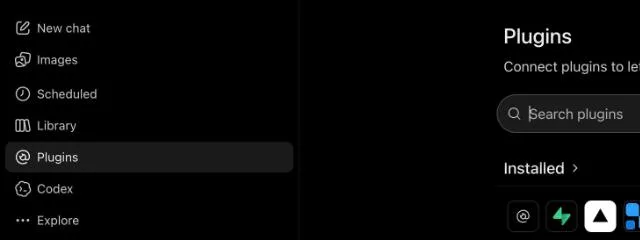
Click Add, then Add custom MCP server
At the top right of the Plugins page, click Add, then choose Add custom MCP server.
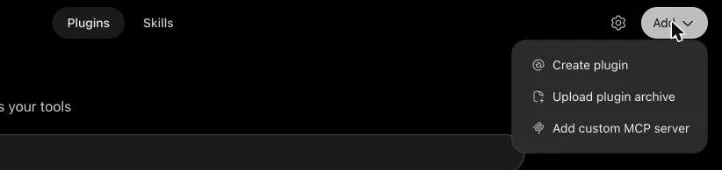
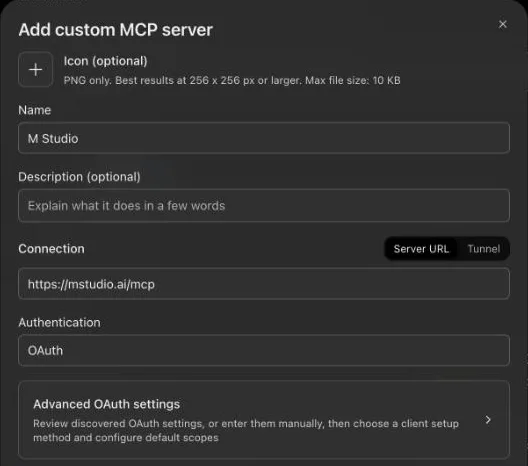
Paste the M Studio server URL
Name it M Studio. Leave Connection set to Server URL, paste the address below into the field, and leave Authentication set to OAuth.
https://mstudio.ai/mcp
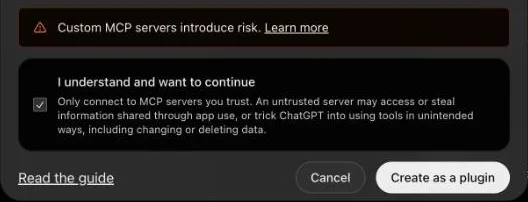
Tick the box, then click Create as a plugin
ChatGPT warns you about servers it has not reviewed. Tick “I understand and want to continue” and click Create as a plugin. An M Studio window opens: sign in with this account and click Connect. There is no API key to copy.
Check it connected, then ask for a film
M Studio lists ChatGPT under Settings, in Connectors, as soon as you click Connect. Start a new ChatGPT chat and describe the film you want.
Open Connectors in M Studio
This works in ChatGPT in a web browser. If the Add menu has no “Add custom MCP server”, your ChatGPT account or workspace does not allow custom servers yet. On a Business or Enterprise workspace, an admin can allow them.
If it does not connect
- No “Add custom MCP server” in the Add menu: your ChatGPT account or workspace does not allow custom servers yet. On a Business or Enterprise workspace, ask an admin to allow them.
- No M Studio window after Create as a plugin: allow pop-ups for chatgpt.com, then click Create as a plugin again.
- The M Studio window asks you to sign in: sign in with the account you use here, then click Connect.
- Still not connected: in M Studio, open Settings, then Connectors, and click Refresh. Or write to us on the Help and support page (mstudio.ai/support).
Everything the editor can do, it can do
A tool for every step of the production, from the first draft of the script to the exported film.
- Create and organize films
- Generate scripts, scenes and shot lists
- Build characters with consistent faces
- Pick director styles and set the film look
- Draw storyboard pictures for any or every shot
- Make a video clip for any shot
- Write and place voiceover
- Compose music and sound effects
- Re-cut, retime and reorder the timeline
- Export the finished film
You approve it, once
Standard OAuth. You sign in to M Studio and approve the connection. Your password is never shared with the AI app.
Your plan, your limits
Generation draws on the same quota and wallet as the editor. Connecting adds no charge, and quota limits still apply.
Revoke any time
The Connectors page in Settings lists every connected app. Revoking cuts access immediately.
How it works
From script to screen in six steps
M Studio builds a film shot by shot, and you direct every shot — this is the whole path, start to finish.
- 01
Start a film
Start from a one-line brief, or import a screenplay PDF and build straight from the pages you already wrote.
- 02
Add your script
Scenes, action and dialogue laid out shot by shot — editable line by line before anything renders.
- 03
Add your characters
Add each character once with a reference image so the same face carries across every shot in the film.
- 04
Build the storyboard
Your script breaks into shots on a canvas. Reorder, reframe and re-prompt any shot until the board reads right.
- 05
Make the video clips
Turn approved storyboard pictures into video clips one shot at a time, then layer voiceover, music and sound effects.
- 06
Export the cut
Take the finished cut out as an MP4, MOV or WebM, up to 4K on Professional and up, ready for the edit or the pitch.
There is no length cap in the editor. Because films are made shot by shot, how long a film can run comes down to how many video clips your plan includes — not a limit in the tool.
Questions
Do I need to know anything technical?
No. If you can use Claude or ChatGPT, you can use this. You paste one URL into your AI app's settings (in ChatGPT: Plugins, then Add, then Add custom MCP server), sign in to M Studio, and click Connect. There is nothing to install and no API key to copy unless you want one.
Is this instead of the M Studio editor, or as well as it?
As well as. Everything the assistant does lands in your normal M Studio film, so you can open the editor at any point to adjust a shot by hand, then hand control back. Many people script and rough out a film by chatting, then finish it in the timeline.
Does it spend my money without asking?
Generation draws on the same plan quota and wallet balance as the editor — connecting does not add charges by itself. The assistant is instructed to tell you how many shots it is about to render and wait for you to confirm before any bulk generation, and to check your remaining quota at the start of a session.
What can it actually see?
Your films, scripts, shots, characters and generated media, and your plan and remaining quota. It never sees your password or payment details, and it cannot change your plan or billing.
How do I disconnect it?
The Connectors page in M Studio settings lists every connected app with a Disconnect button. Disconnecting takes effect immediately.
Which AI apps work?
Anything that speaks the Model Context Protocol over HTTP: Claude (web, desktop and Claude Code), ChatGPT on the web where your account or workspace allows custom MCP servers, Cursor, and a growing list of others.
Describe a film. Get a film.
Copy the URL, connect your assistant, and ask for something.
$1 today for 24 hoursThen from $27/mo unless you cancelReminder email ~6h before it ends